How we work

Every person, their own training.
Guided and inside Parker.

Depending on their role, every person in your company has their own training, which guides them through their screens step by step. They do it whenever they like, they know where they're up to, and their manager sees how each person is getting on. With your consultant by your side from day one.

See it in action Get your proposal
01Based on your roleOnly what you'll use, in order of importance.
02Whenever you likeInside Parker, at your own pace, with no courses or timetables.
03You know how you're doingWhat's done, what's left and the next step.
04Your manager sees itThe progress of every person in the company.
It's that easy

You log in, press "Start" and Parker guides you.

Your training is waiting for youYou open My training and Parker has prepared yours, based on your role, with the first chapter highlighted.
It guides you on your screenYou press "Start" and it takes you through the real screen, button by button, explaining everything. With voice if you like.
Pick up where you left offEvery chapter you finish adds to your percentage. If you stop halfway, you come back to the same point.
See it in action

A real chapter, from start to finish.

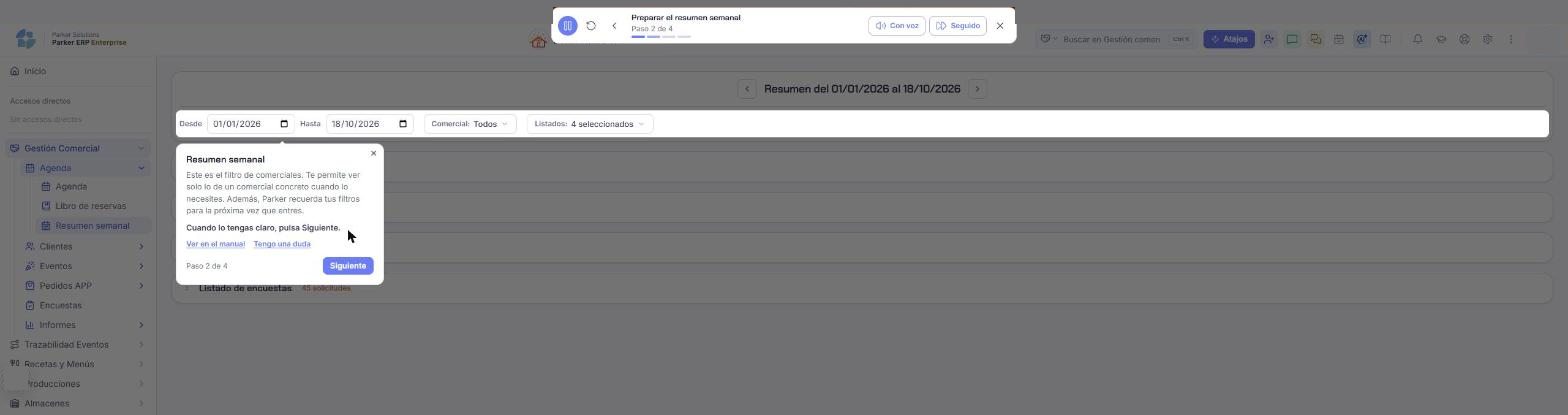
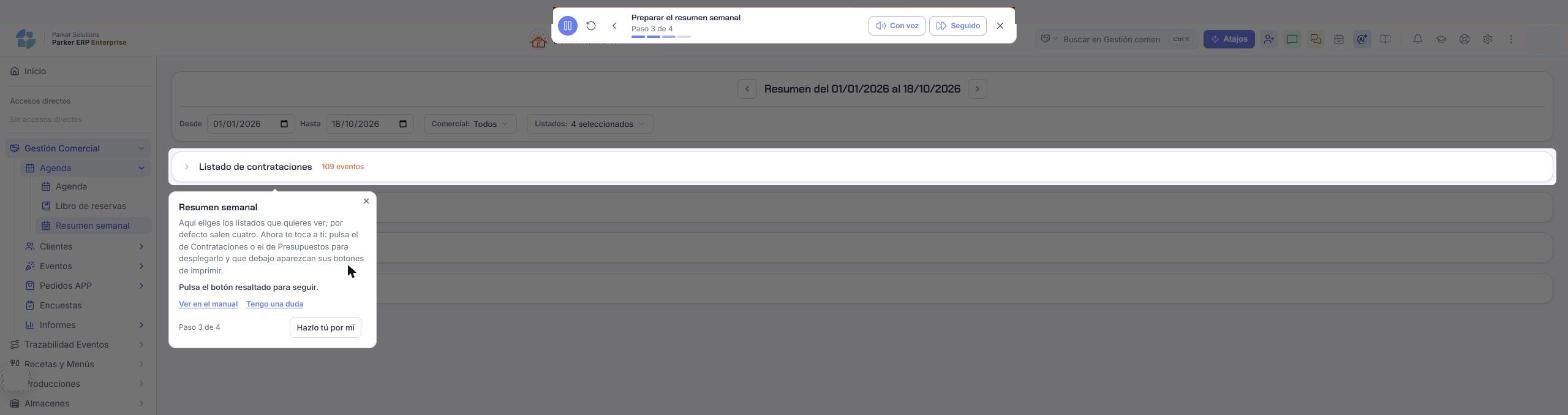
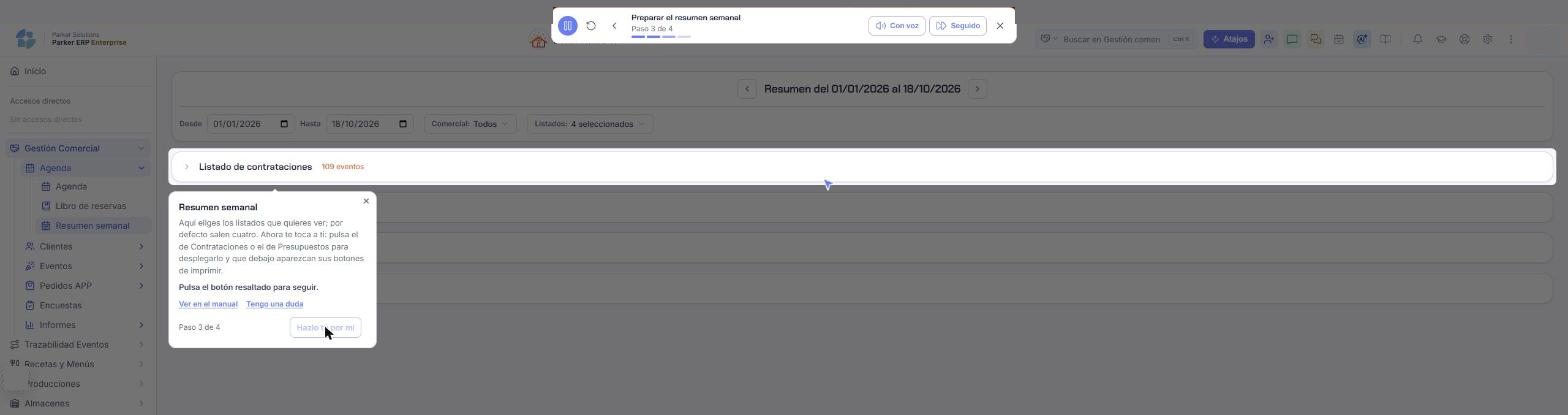
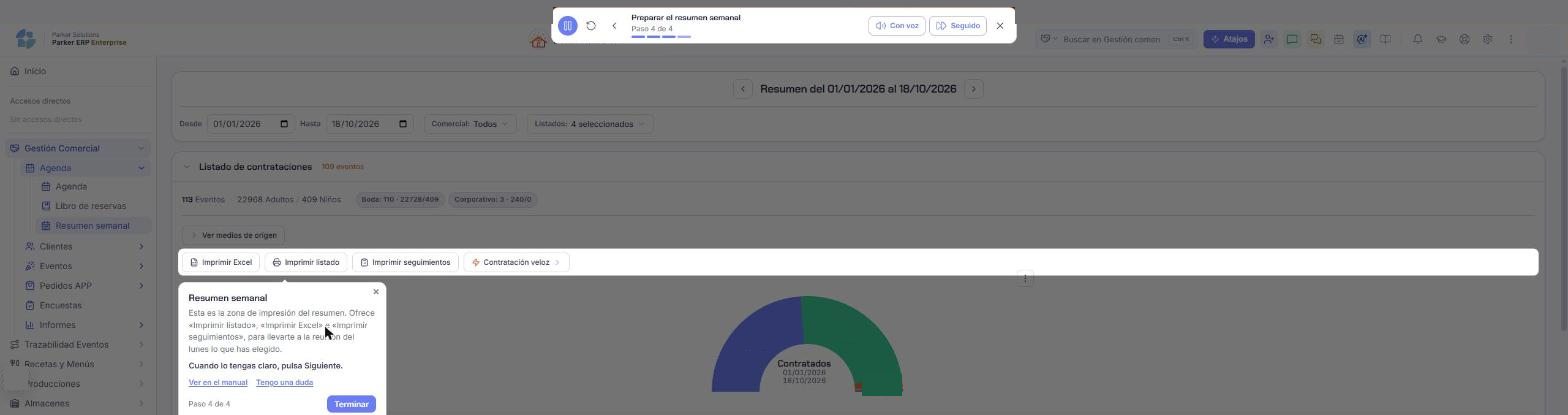
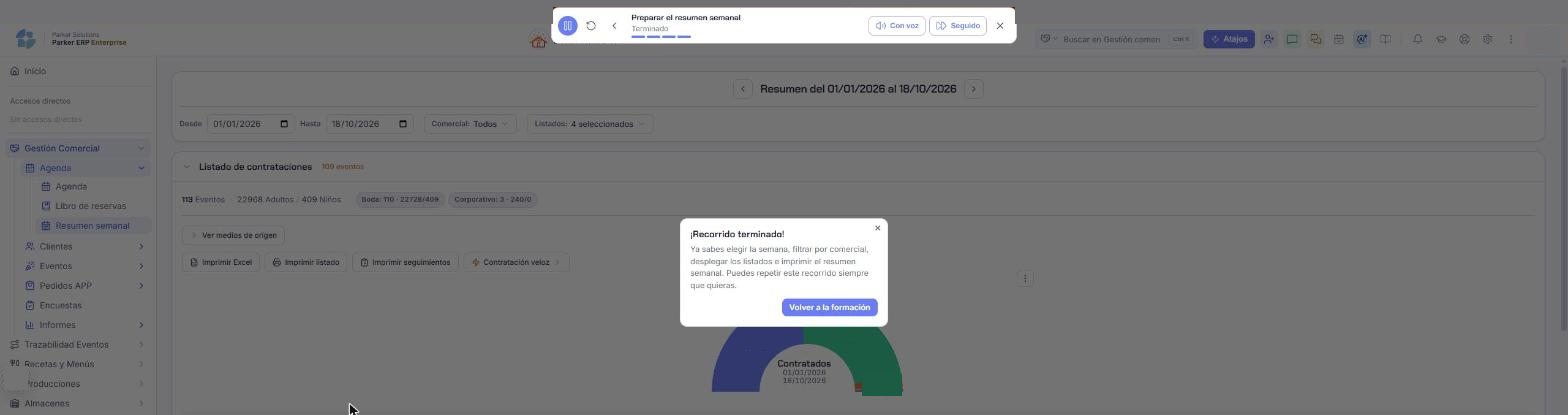
"Preparing the weekly summary", for Monday's sales meeting: four steps on the real screen.
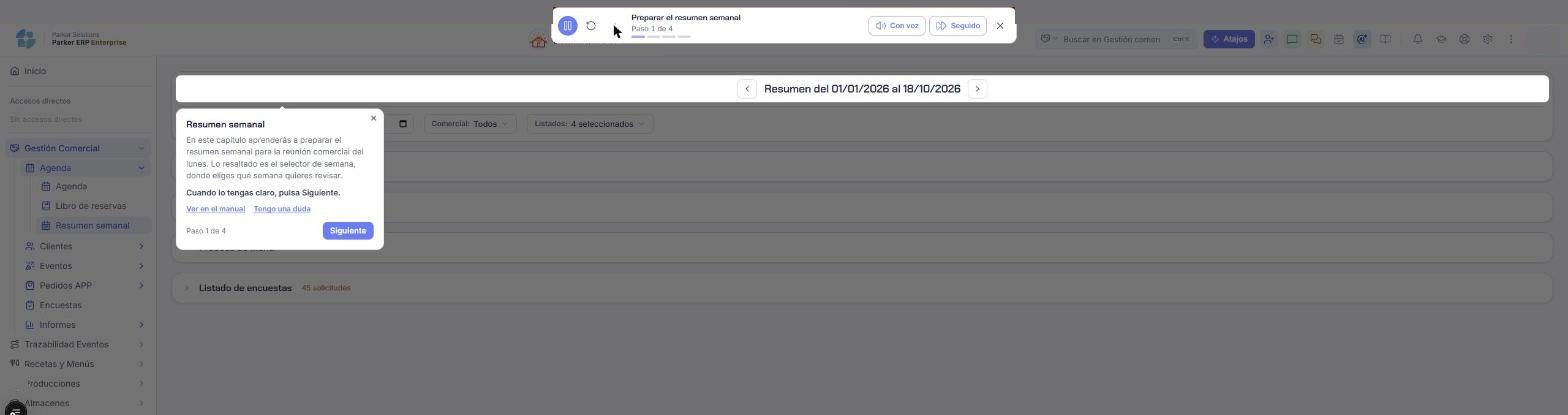
IN PARKER Step 1: the assistant explains the week selector Step 2: the assistant points out the sales rep filter Step 3: your turn, open a list Step 3: with Do it for me, Parker does it for you Step 4: the summary's print area Tour complete
Real Parker screenshots, with names hidden.With voice, continuous or step by step.
For every person

Their training, based on their role.

Parker looks at each person's role and permissions and prepares their path. The kitchen doesn't learn the same as sales, and nobody wastes time on what they won't use.

Essential, recommended or availableEach chapter is marked according to what matters for that role, and is taught in that order.
They know where they standOverall and essential percentage, what they've done, what's left and the next chapter.
Whenever they like, as often as they likeEach chapter takes a few minutes and can be repeated whenever needed.
Get to know the screenGuided taskFull workflow
Hello, Laura Based on your role: Kitchen
START HERE Review and sign off a recipe's allergens Kitchen · 6 steps · on your own screen
Start
Overall progress 38%
Essential for your role5 of 8
Recommended3 of 12
AvailableOptional
✓Find a recipe and understand its recipe costingDone
✓Work with preparationsDone
○Review and sign off a recipe's allergensEssential
○Prepare a service sheetRecommended

Sample data.

For managers

See how each person on your team is getting on.

The manager can see the progress of every member of the company: who's up to date, who has fallen behind and on which essential chapters.

By person and by roleEach person's percentage and the essentials they're missing.
Without chasing anyoneEach person sees their next step in Parker; you just check who needs a nudge.
With your consultantIf someone gets stuck, your consultant looks at it with you and gets them moving again.
Team training6 people
L
LauraKitchen
38%
3 essentials
M
MarcosSales
72%
Up to date
A
AnaMaître d'
15%
6 essentials
J
JavierWarehouse
100%
Completed
C
CarmenAdministration
54%
Up to date
D
DavidPurchasing
46%
1 essential

Sample data.

And if you have a question

The manual, inside every screen.

On any screen you can open its manual: what it's for, where it is, how to do things and what's worth knowing. And if you can't find it, ask in your own words.
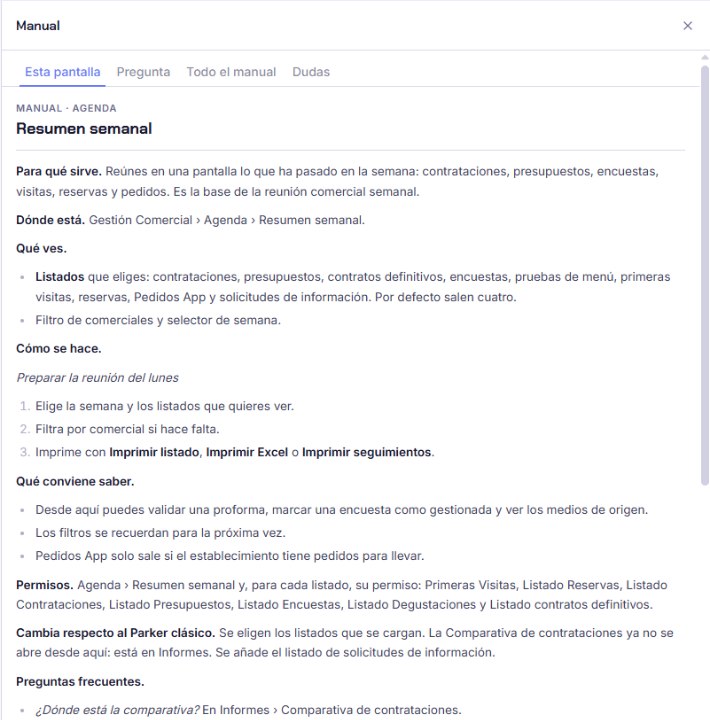
This screenThe manual for what you're looking at, without searching for it.
Ask the manualIt answers with the steps and a link to where it's done.
I have a questionFrom any training chapter, without losing your place.
Parker's manual panel open on the Weekly summary screen, with the tabs This screen, Ask, Full manual and Questions

The manual panel open on a screen. Real Parker screenshot.

With every module

Training is included. Implementation, tailored to you.

There's no separate training to buy: it comes with every module. We quote the implementation in each proposal, based on what you take on.

Included

The training assistant

Every person on your team learns the module inside Parker, on their own screen and according to their role. No separate courses or paper manuals.

In your proposal

Implementation, tailored to you

Your consultant sets up Parker with you, loads your data and gets it running. The price depends on the modules you choose and on how your company works, and we set it out in your proposal.

Better value

The more modules you take, the less each one costs.

Taking more modules is always better value than taking fewer. You'll see it in your proposal.

What each module costs you, depending on how many you take.

Groups and multiple sites

Special group pricing.

If you have several companies or venues, we prepare special pricing for your group, with all your businesses in the same Parker.

Build your Parker
Your consultant, from start to finish

Four steps. The same consultant throughout.

Tap each step to see what we do and what you do.

After go-live

We stay with you. You choose how.

With Parker up and running, you have the support channel and, whenever you want to go further, hours with your consultant.

Support channel

For day-to-day questions and incidents, with a team that knows your business and how you've set up Parker.

  • Questions about use and configuration
  • Incidents
  • With the training and the manual always to hand

Consultancy hours

When you want to go beyond go-live, with the same consultant who already knows your company.

  • New configurations and adjustments to your operations
  • Advanced training for your team
  • Help when adding new modules

Hour bundles, on special offer.

If you expect to need more time with your consultant, take a bundle of 3, 5 or 10 hours on special terms. Your consultant sets them out in your proposal.

◷ Each session, from 30 minutes
3hours
5hours
10hours
Parker Solutions · Your technology partner

With separate tools you pay several subscriptions and your data never connects. With Parker, everything is in one place.

One single toolOne single databaseAll your departments connectedAll your information up to date, in real time
Why one ERP and one partner →

Your team, trained without stopping work.

Tell us what you need and we'll prepare your proposal, with training included.

Get your proposal Already a client · Add modules