Module · Human Resources

Your team, scheduled and clocked in.
Within the law.

Permanent staff and event staff, front of house, kitchen and office. Who works at each event and what it costs, the week’s schedule, time tracking with its working-time records, and the close-off that feeds payroll. In the same ERP as your events.
Get your proposal Time tracking
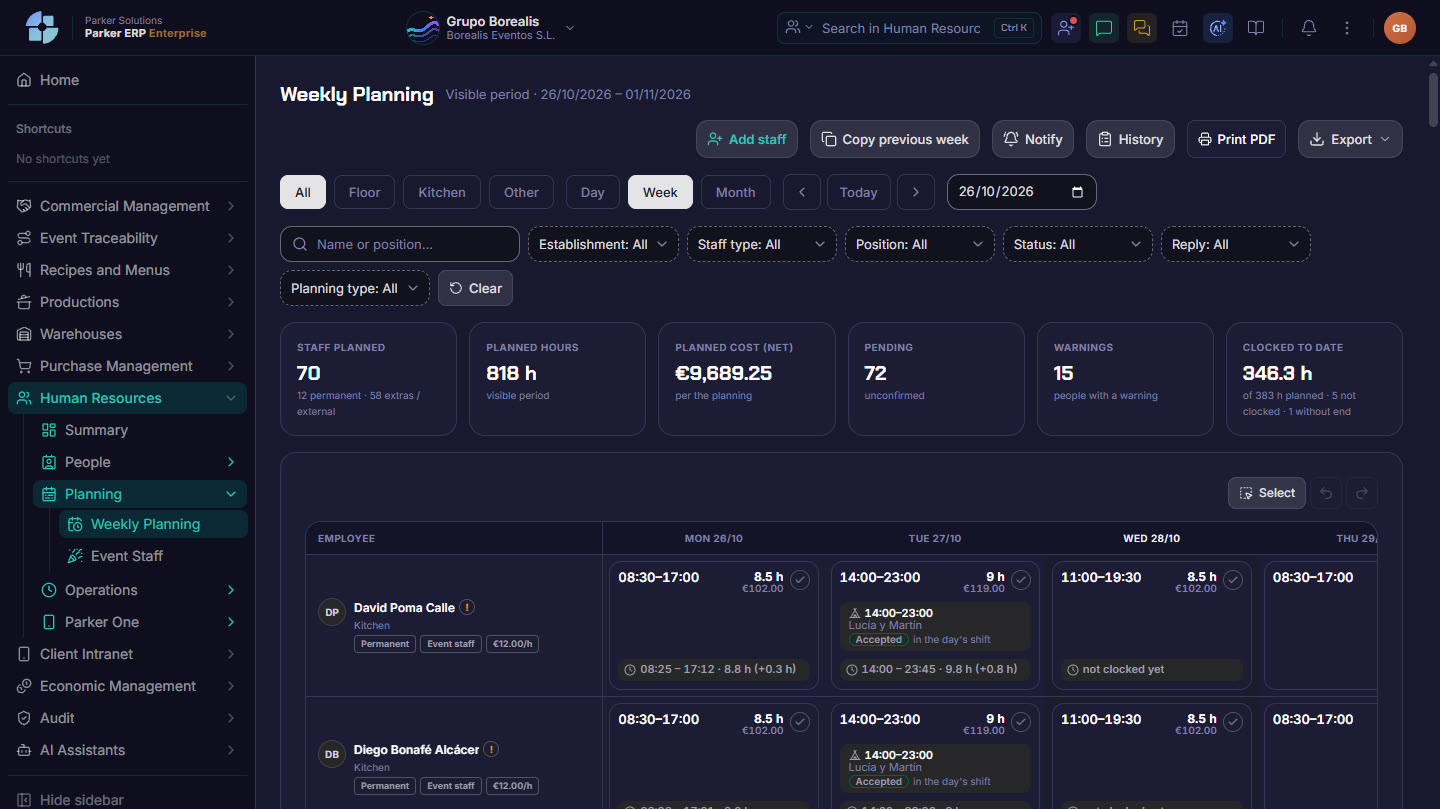
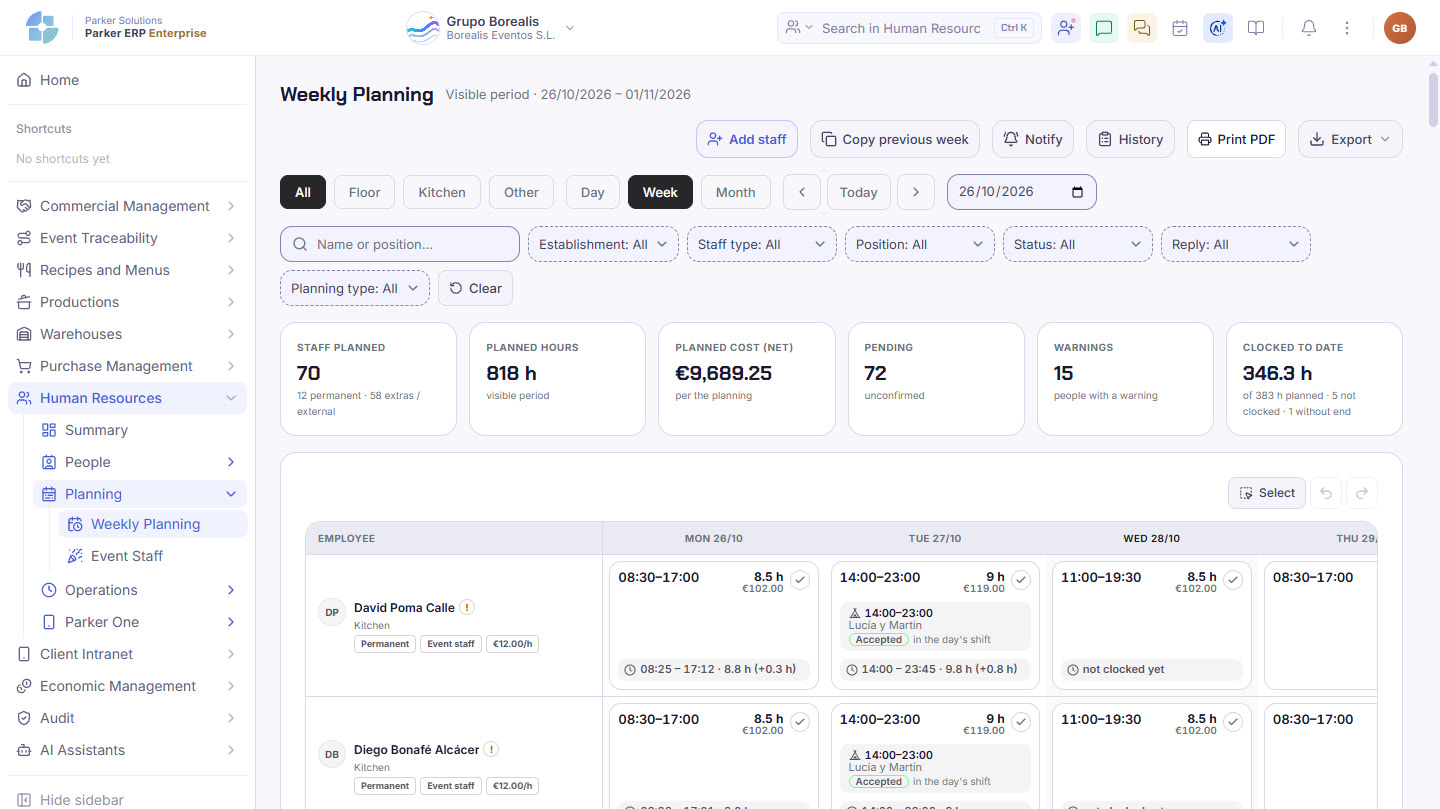
Parker screenshot: the weekly schedule, with planned staff, hours, forecast cost and time clocked so far.
The weekly schedule: planned staff, hours, forecast cost and time clocked so far. Real Parker screenshot with demo data.
When you log in

Your team’s week, on one panel.

What is planned, what is happening now and what needs sorting out, with direct access to each part.

PlannedStaff and hours this week
NowWho is working
CostForecast staff cost
Time trackingApproved records
TasksOpen and done today
AttentionAlerts and anomalies
From the event to payroll

Every person, from the schedule to the close-off.

Click each step.

Event staffing

Every event, with its team and its cost.

Weddings, conferences or company lunches: week by week you see which events have their staff covered, which need attention and what each event’s team costs.

Positions to fillEach event shows how many positions are still open, with the estimated staff for its type and number of guests, and the cost against the forecast.
TemplatesYou apply the staffing template for their type to several events at once, and adjust whatever you need.
Call-upsYou call up your event staff and see who accepts. An accepted call-up becomes the shift they will clock in for.
PrintoutsStaff for the week or the day, front-of-house staff by table and the event’s tasks, ready to print.
Weekly schedule

Everyone’s week, on one screen.

Permanent staff and event staff, front of house, kitchen and office, by day, week or month, with each person’s shifts and events.

Each person’s shifts and eventsPlanned hours, forecast cost, event staff, replies pending and time clocked so far, with each worker’s weekly summary.
Front of houseKitchenOtherDayWeekMonth
No starting from scratchYou copy the previous week, notify the team of changes and keep the history. As PDF or Excel.
Days they can’t workEach worker marks on their phone the days they can’t come in, and the office sees it on the schedule straight away.
Time tracking

Clocking in is easy. So is compliance.

Your team clocks in from a tablet on site or from their phone, and Parker keeps the working-time record the law requires, flagging anything that doesn’t add up before it becomes a problem.

Tablet or phoneRegistered tablets on site with a PIN or QR code, or each worker’s phone with their location when clocking in. With a clock-in location for each event.
Live clock-inWho is working, on a break, not clocked in, absent or yet to clock out, person by person.
What needs attentionMissing breaks, unrecorded clock-outs, people who haven’t clocked in or who clock in without being registered with Social Security, and workers who dispute a time entry.
Anomalies reviewedEach anomaly with its details, who reviews it and how it is corrected, with the actual time and the correction both saved.
Working-time recordBy worker and by month, with the source of every time entry (tablet, phone or manual), the worker’s approval and its verification.
On the worker’s phoneTheir clock-in, their upcoming shifts, their notifications, their documents to sign and their correction requests. No amounts.
Daily working-time recordKept for four yearsBreaks on long shiftsServer time and source of every entry
Close-off and Finance

Hours worked, closed off and ready for payroll.

The close-off compares what was planned with what was clocked and marks each person as approved or pending, with what has to be paid and what goes to their hours bank.

Close-off by day, week, month or rangePlanned and actual hours, amount, hours to pay, to the hours bank and variance, by person, position or department.
For your payroll adviserThe list for your adviser and the close-off Excel file, with nothing to redo.
Advances, payslips, balances and paymentsIn Finance › Workers, with each person’s costs and reports.
ReportsWorking-time record, hours balance for permanent staff, cost per event and per worker, schedule against clocked time, and absenteeism.
People and administration

Everything about each person, in their profile.

Your team listed by position and department, with its org chart, and all the admin in one place.

Staff list and org chartYour team by position, contract type and status, with alerts for anyone who hasn’t logged in for a while or has no profile. In Excel whenever you like.
Holidays and absencesRequests, calendar and holiday balance for each person, and offsetting against the hours bank.
Documents with e-signatureEach person’s and the company’s documents, pending signature and signed from the phone.
UniformsWhat is handed out to each person, with its receipt.
Profiles and permissionsWho can see and do what, by profile, and who sees more than their profile allows, with the change history.
Day-to-day operations

Each department’s tasks, in plain sight.

A task centre for the site’s day, for each person and for each event.

Task centreToday on site, my agenda, all staff or by event, by department, with tasks done, pending, urgent and overdue.
Parker One for the teamEach worker sees their clock-in, shifts, agenda and requests on their phone. And whoever runs the event has the event’s staff in the palm of their hand.
Connected

From the event sold to the payroll paid.

Staffing comes from the events in the CRM, shows in Event traceability, is clocked in Parker One and the close-off reaches Finance.

Sales & CRM Event traceability Finance Parker One
Parker Solutions · Your technology partner

With separate tools you pay several subscriptions and your data never connects. With Parker, everything is in one place.

One single toolOne single databaseAll your departments connectedAll your information up to date, in real time
Why one ERP and one partner →

Your team, scheduled and clocked in.

Your consultant shows you what your team’s next week would look like in Parker.

Get your proposal Already a client · Add modules