Module · Finance

What you pay and what you collect.
Reconciled and ready for your accountant.

Suppliers, clients, staff and cash, in the same ERP as your events. Delivery notes and invoices are read automatically, your clients’ invoices come from each event and everything is exported to your accounting software.
Get your proposal Delivery notes and invoices read automatically
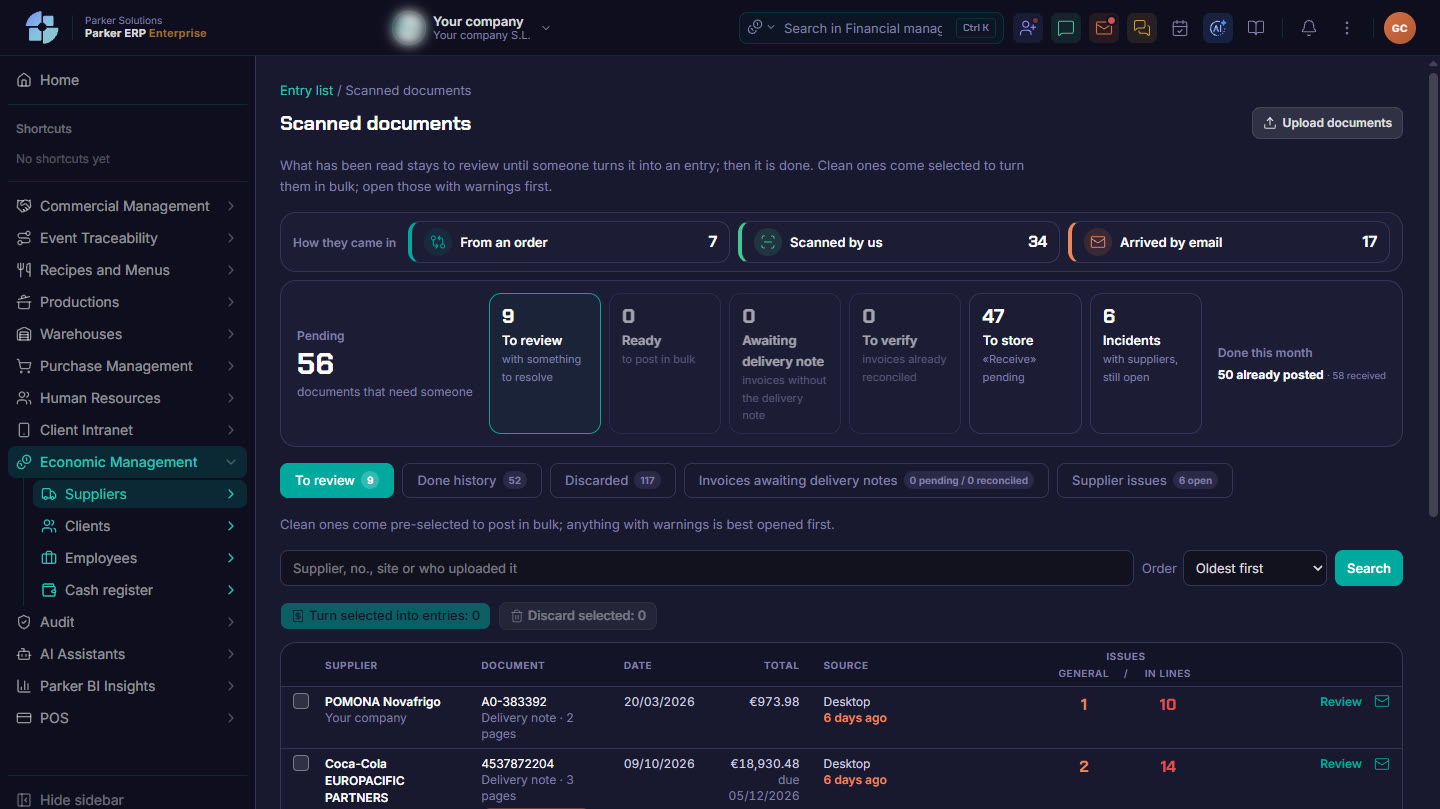
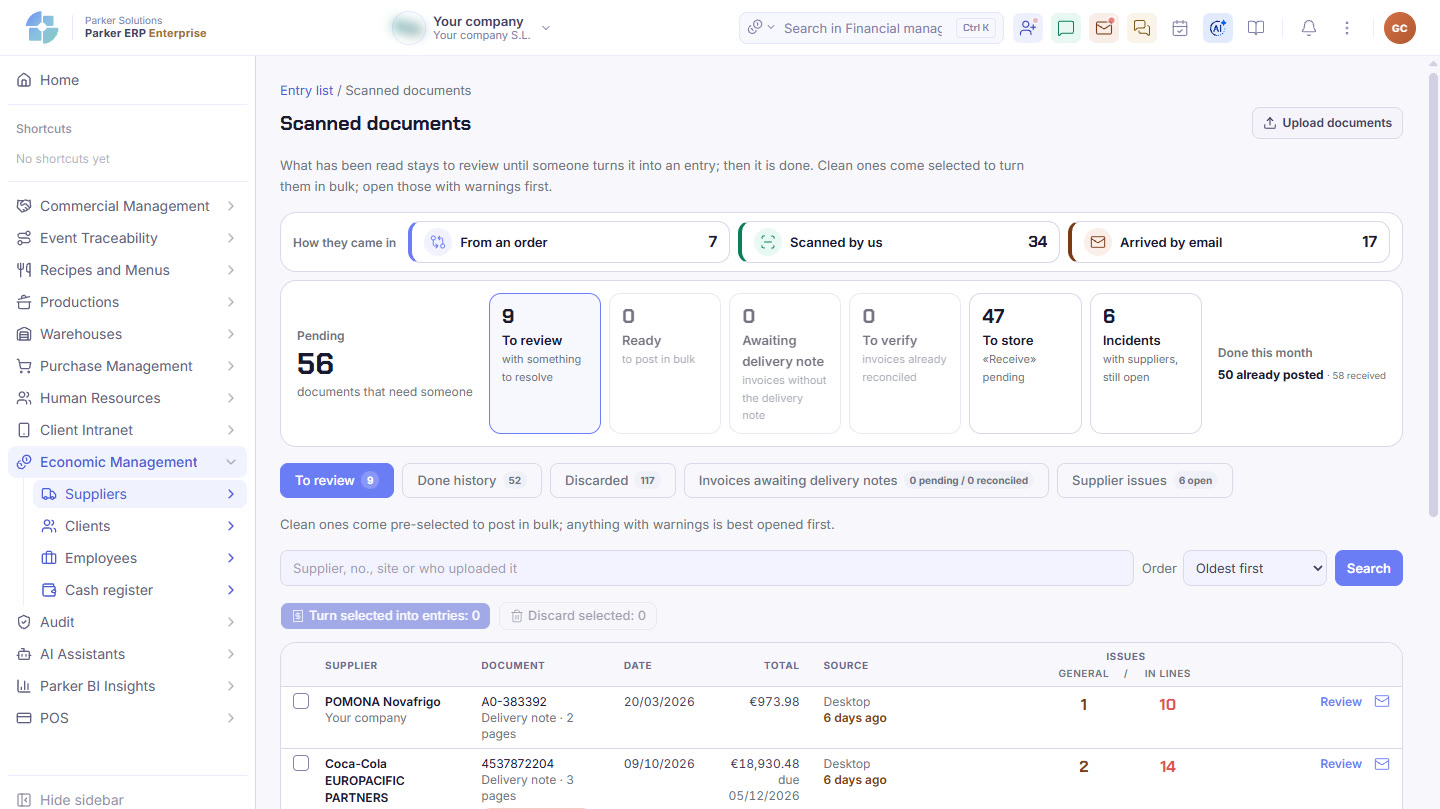
Parker screenshot: supplier delivery notes and invoices read automatically, showing how they came in and what still needs reviewing.
Supplier delivery notes and invoices read automatically: how they came in and what still needs reviewing. Real Parker screenshot with demo data.
Supplier documents

The delivery note reads itself.
You only look at what does not match.

You take a photo of the delivery note, upload the PDF or it arrives by email: Parker reads it, recognises the supplier, matches it against the order and proposes the entry. Clean ones are posted in bulk; anything with alerts is opened and reviewed.

From the orderWhen the goods are received, the delivery note is matched against what you ordered.
Scanned by your teamA photo from a phone or a PDF from the scanner, even without an order.
Received by emailInvoices your supplier sends you come in on their own.
To reviewSomething needs resolving.
ReadyClean, to post in bulk.
Awaiting delivery noteInvoices that do not yet have their delivery notes.
To verifyInvoices already matched with their delivery notes.
To put awayStill to be booked into the warehouse.
IssuesWith suppliers, until they are closed.
Transcribes what the document says, without inventing anythingHandwriting is flagged separatelyLines are reconciled with the totalDuplicate documents detectedNothing is saved until you confirm it
Suppliers

What you owe, to whom and when.

All supplier delivery notes and invoices in one list, with their attachments, and each supplier’s balance so you can prepare payments.

Entries listDelivery notes and invoices by period, supplier, type and issues, with their files and who entered them, and those read by AI one click away.
Balances and payment proposalsWhat is outstanding with each supplier, with its terms, payment method and due date, ready to propose payment.
PaymentsTransfers, direct debits, card or promissory notes, by bank and status.
Payments listDirect debitsPromissory notes controlRecurring paymentsPayment proposalsHistory
Deferrals and loansWhat has been deferred with each supplier and your bank loans, with their instalments and outstanding principal.
Supplier issuesAnything that arrived wrong or at a different price, so you can claim it until it is closed.
Clients

Every event, invoiced and paid.

From the event’s pro forma to the invoice and the payment, without retyping what is already in the CRM.

Pro formas, delivery notes and invoicesThe invoice comes straight from the event, by series, with automatic invoicing and credit notes.
Collections and SEPA direct debitsEach client’s due dates, direct debit batches sent to the bank and overdue payments in view.
Balances and collection proposalsWhat each client owes you and what you hold in their favour, with their terms.
DepositsPayments on account for each event, with their receipt.
Staff

From the staff close to payroll.

What your team worked, permanent staff and extras, is closed, paid and turned into cost, with no spreadsheets in between.

CloseBy day, week, month or range: planned and actual hours, hours to pay and to bank, variance and each person’s sign-off. With the list for your payroll adviser and the Excel file.
AdvancesRequests that staff send from their phones are approved or rejected here, with their instalments and history.
PayrollEach month’s payslips for permanent staff and extras, with Social Security, income tax withholding (IRPF), garnishments and employer cost, and the weeks still to be signed off before closing the month.
Balances and paymentsWhat is owed to each person, with validated payslips pending payment. Paid by transfer, direct debit batch or cash, with proof of payment.
Permanent staff and extras balancesPayment proposalsPayment batchesProof of payment
Costs and reportsStaff cost by month, by employee and by venue, and reports on working-time records, hours balance, cost per event, schedule against clock-ins and absenteeism.
Cash and accounting link

Cash, reconciled. Your accountant, sorted.

Day-to-day cash handling and the files your accounting needs, without redoing anything.

Cash controlCash in and out with its balance, linked to the invoice or payment, and reconciliation movement by movement.
Connected to your accounting softwareParker does not replace your accounting: it sends it the chart of accounts, the journal and the VAT register in your software’s format, and gives you the analytics for each event.
SQL ContaSageA3ERPContasol
On your phoneClient and supplier balances, invoicing, deposits and payments, to check from Parker One. And the document scanner in your pocket.
Connected

The money follows the event.

Collections come from the CRM, supplier invoices arrive from Purchasing, hours worked come from Human Resources and everything ends up in your accounting and in Parker BI.

Sales & CRM Purchasing Warehouses Human Resources Parker One
Parker Solutions · Your technology partner

With separate tools you pay several subscriptions and your data never connects. With Parker, everything is in one place.

One single toolOne single databaseAll your departments connectedAll your information up to date, in real time
Why one ERP and one partner →

What you pay and what you collect, reconciled.

Your consultant shows you how Parker would read your suppliers’ delivery notes.

Get your proposal Already a client · Add modules